

Building a premium home theater experience no longer requires running cables through walls or dedicating entire rooms to equipment racks. The Sonos surround system has transformed how homeowners approach immersive audio, combining wireless convenience with performance that rivals traditional receiver-based setups. Whether you're upgrading from basic TV speakers or designing a dedicated viewing space, understanding the architecture and capabilities of Sonos home theater solutions will help you create the cinematic soundscape your content deserves.
Understanding the Sonos Surround System Architecture
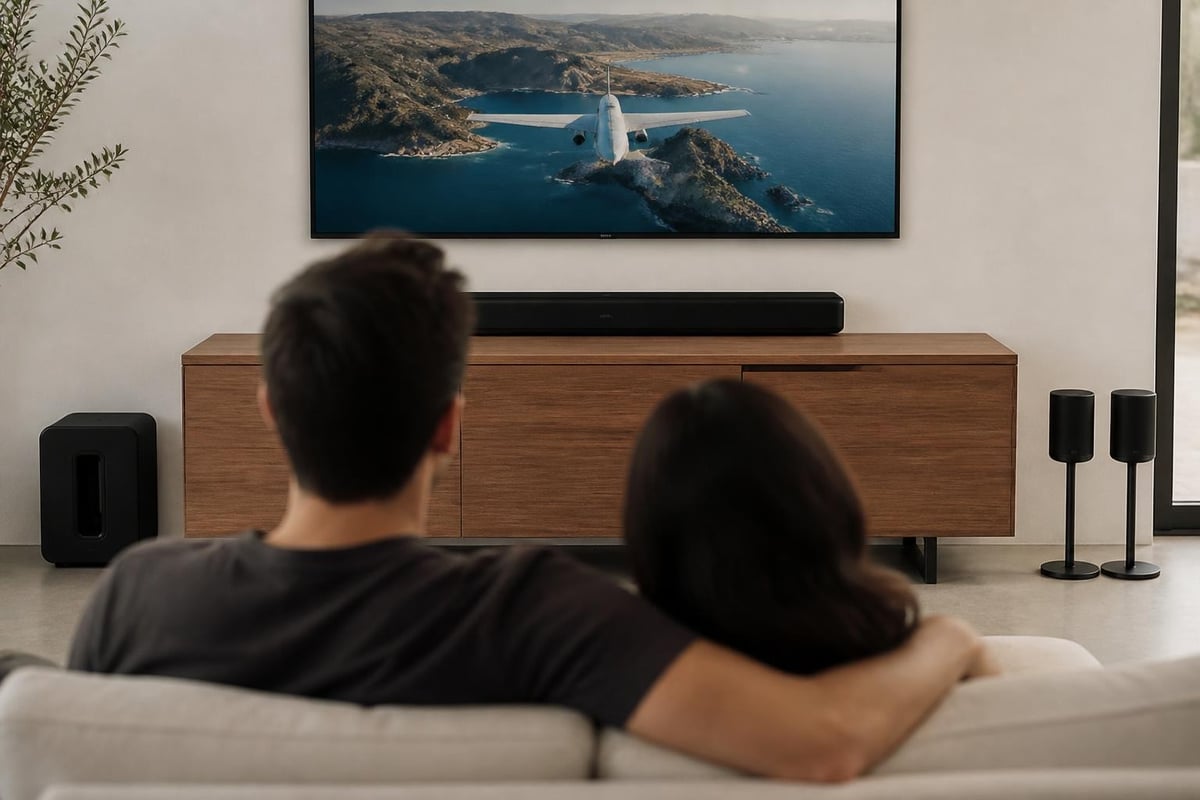
A Sonos surround system centers around a soundbar as the primary hub, which serves as both the front-channel speaker array and the brain coordinating all other components. The Arc Ultra and Arc represent the flagship models, while the Beam (Gen 2) offers a compact alternative for smaller spaces. These soundbars connect directly to your television via HDMI eARC, which enables high-bandwidth audio formats including Dolby Atmos.
The system expands through wireless integration of additional speakers and subwoofers. Two Sonos speakers positioned behind the listening area create dedicated surround channels, while one or two Sub models handle low-frequency effects. This modular approach allows you to start with a soundbar and gradually build toward a complete surround configuration as budget permits.
Core Components and Their Roles
Each element in a Sonos surround system performs specific acoustic functions:
- Soundbar (Arc Ultra, Arc, or Beam): Delivers front left, center, and right channels plus upward-firing drivers for height effects
- Surround speakers (Era 300, Era 100, or One SL): Reproduce rear and side surround channels for spatial immersion
- Sub (Gen 3 or Sub Mini): Handles frequencies below 80Hz, adding impact to explosions, music, and low-end effects
- Sonos App: Controls configuration, EQ adjustments, and room calibration through Trueplay tuning
The wireless mesh network created between these components eliminates the cable clutter traditional systems require, though each device still needs power. Enhanced Audio Return Channel (eARC) connectivity ensures your TV can pass uncompressed Dolby Atmos signals to the soundbar without bandwidth limitations.
Choosing the Right Configuration for Your Space
Room dimensions and intended use determine which Sonos surround system configuration will perform optimally. A 10×12-foot bedroom demands different components than a 20×25-foot dedicated theater space. The Arc Ultra suits rooms where you sit 10-15 feet from the screen, while the Beam works better in compact arrangements with 6-9-foot viewing distances.
Ceiling height impacts Atmos performance significantly. The upward-firing drivers in the Arc and Arc Ultra bounce sound off ceilings to create overhead effects. Flat ceilings between 8 and 10 feet deliver ideal results. Vaulted or textured ceilings scatter reflections, reducing height channel clarity. In such spaces, focusing budget on exceptional surround speakers rather than premium soundbar models often yields better overall immersion.
Matching Components to Room Size
| Room Size | Recommended Soundbar | Surround Speakers | Subwoofer |
|---|---|---|---|
| Small (< 150 sq ft) | Beam (Gen 2) | Era 100 pair | Sub Mini |
| Medium (150-250 sq ft) | Arc | Era 100 or Era 300 pair | Sub (Gen 3) |
| Large (250-400 sq ft) | Arc Ultra | Era 300 pair | Sub (Gen 3) or dual Subs |
| Very Large (> 400 sq ft) | Arc Ultra | Era 300 pair | Dual Sub (Gen 3) |
Budget allocation matters as much as room size. Starting with a quality soundbar and adding surround speakers delivers more noticeable improvement than purchasing a soundbar plus subwoofer without rear channels. The spatial dimension surround speakers provide enhances nearly all content, while subwoofer impact varies dramatically between action films and dialogue-driven dramas.
Installation and Physical Placement Strategies
Proper placement transforms adequate Sonos surround system performance into exceptional experiences. The soundbar should sit directly below or above your television, centered on the screen. Maintain at least two inches of clearance on all sides for proper heat dissipation and acoustic dispersion. Wall-mounting using the official bracket positions the drivers at ear level when seated, typically 38-42 inches from the floor.
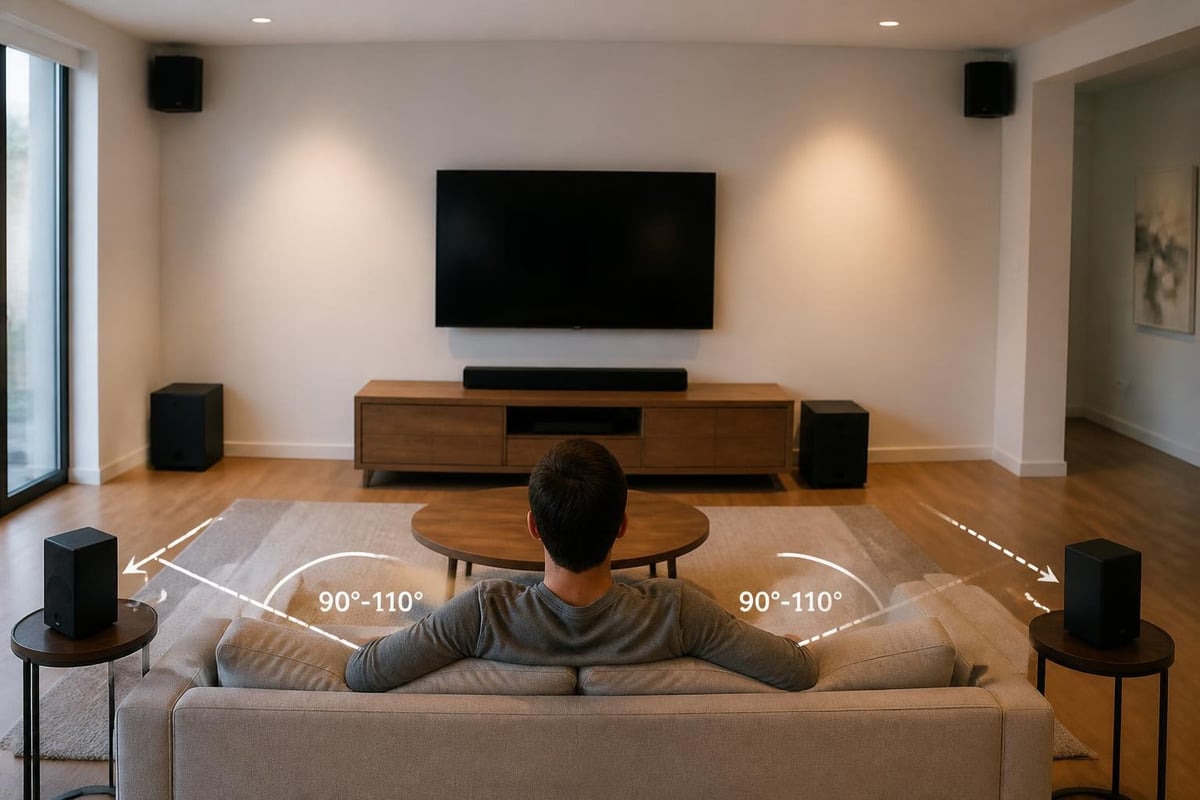
Surround speakers belong 90-110 degrees off-axis from the primary listening position. If your couch sits against the back wall, mount the speakers on the side walls pointing toward the seating area. For mid-room furniture, place speakers on stands slightly behind and to the side of listeners. The Dolby speaker setup guides provide detailed diagrams showing optimal angles for different room configurations.
Subwoofer placement requires experimentation. Bass frequencies interact with room boundaries in complex ways, creating peaks and nulls at different locations. Try these positions in order of effectiveness:
- Front corner adjacent to the soundbar
- Opposite front corner from the soundbar
- Mid-point along a side wall
- Behind the seating position (if space permits)
Walk around the room while test tones play, listening for the smoothest, most even bass response. The location where bass sounds consistently powerful without becoming boomy or thin typically performs best.
System Configuration and Calibration
Initial setup through the Sonos app walks you through network connection and component pairing. Once all devices appear in your system, designate your soundbar as the home theater room and add surround speakers and subwoofer to that room. The app automatically configures these devices for surround duties rather than independent music playback.
Trueplay tuning measures your room's acoustic signature and adjusts speaker output to compensate for reflections, absorption, and resonances. Using an iOS device, you'll wave the phone around the listening area while test tones play. The algorithm analyzes how sound reaches different positions and creates a custom EQ profile. This process typically improves clarity and balance more than any manual adjustment.
Advanced Audio Settings
Beyond Trueplay, several settings fine-tune performance:
- Surround Audio Level: Adjust rear speaker volume relative to the soundbar (-15 to +15)
- Sub Audio Level: Control low-frequency output intensity
- Height Audio Level: Increase or decrease upward-firing driver emphasis (Arc/Arc Ultra only)
- Speech Enhancement: Boosts dialogue frequencies for improved clarity
- Night Sound: Compresses dynamic range to maintain detail at lower volumes
These adjustments address personal preferences and content characteristics. Streaming services often apply heavy compression to dialogue, making speech enhancement unnecessary. Blu-ray films with wide dynamic range benefit from night sound mode during late-evening viewing when you cannot play at reference levels.
Content Sources and Format Support
Your Sonos surround system performance depends heavily on the audio format your source delivers. Native streaming apps built into modern TVs frequently limit output to Dolby Digital Plus, while external devices offer greater format flexibility. The Sonos Dolby Atmos support documentation details which configurations enable Atmos playback versus standard surround formats.
4K Blu-ray players provide reference-quality Dolby TrueHD and DTS-HD Master Audio tracks that contain spatial metadata for Atmos height effects. Gaming consoles like PlayStation 5 and Xbox Series X output Dolby Atmos when games and apps support it. Streaming devices such as Apple TV 4K, Nvidia Shield, and Amazon Fire TV Cube pass Atmos from Netflix, Disney+, and other services that encode their content accordingly.
| Source Device | Best Audio Format | Connection Type | Notes |
|---|---|---|---|
| 4K Blu-ray Player | Dolby TrueHD Atmos | HDMI to TV eARC port | Highest quality available |
| Apple TV 4K | Dolby Atmos | HDMI to TV eARC port | Requires Atmos-enabled content |
| Gaming Console | Dolby Atmos | HDMI to TV eARC port | Game and app dependent |
| Smart TV Apps | Dolby Digital Plus Atmos | HDMI eARC | Compressed but widely available |
| Cable/Satellite Box | Dolby Digital 5.1 | HDMI or optical | Older format, no height channels |
Verify your television's eARC port supports passthrough of the formats you want to enjoy. Some mid-range TVs from 2022-2024 advertise eARC but limit passthrough to Dolby Digital Plus rather than lossless TrueHD. Check your TV's audio output settings menu and select passthrough, auto, or bitstream mode rather than PCM to preserve surround encoding.
Comparing Sonos to Traditional Receiver Systems
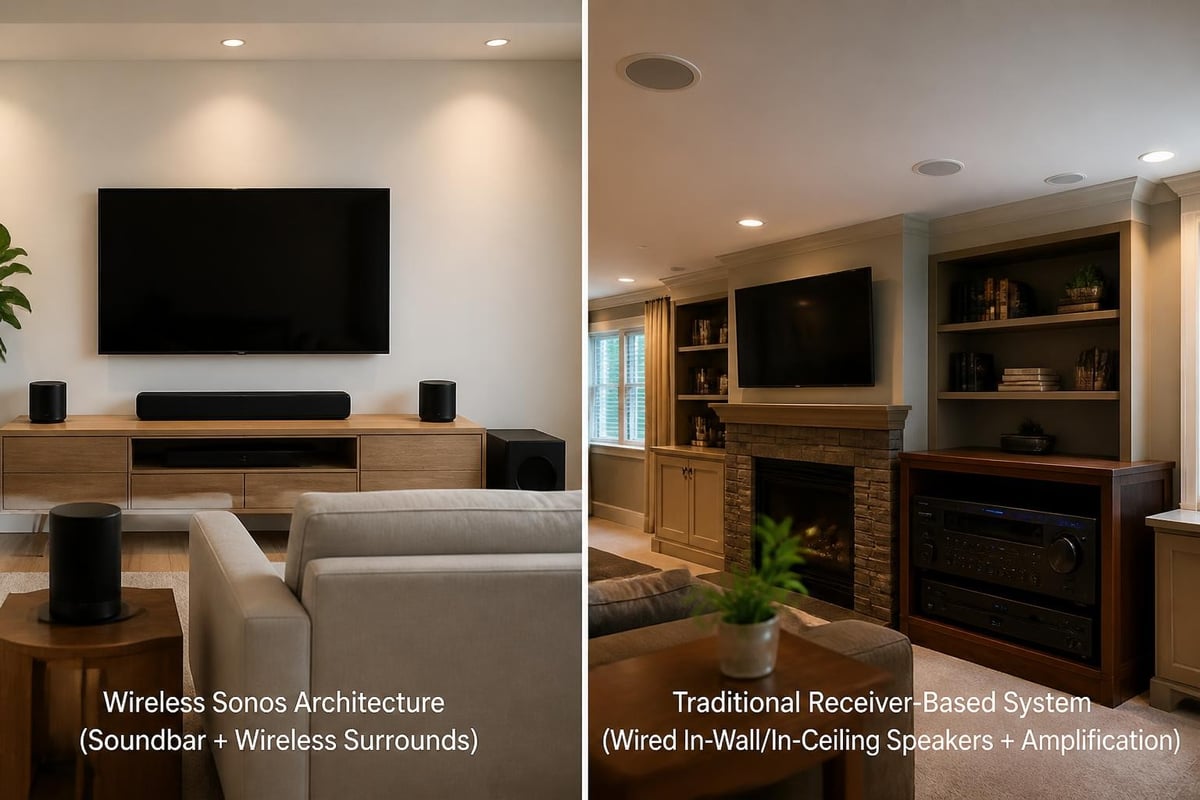
Traditional home theater receivers offer greater flexibility and often superior raw performance, but demand significantly more installation expertise and space. A Sonos surround system trades some acoustic capability for setup simplicity and visual integration. Understanding these tradeoffs helps you choose the right approach for your situation.
Advantages of Sonos surround configurations:
- No receiver cabinet or equipment rack required
- Wireless speaker connections eliminate in-wall cable runs
- Single-app control for all audio functions
- Firmware updates add features over time
- Music streaming and multi-room capabilities included
Limitations compared to traditional systems:
- Fewer surround speaker placement options (only Sonos speakers compatible)
- Limited audio format support (no DTS:X, for example)
- Soundbar driver size constraints affect mid-bass dynamics
- Less upgradeability (cannot swap individual amplifiers or processors)
For homeowners building dedicated theater rooms with the budget for custom installation, traditional systems with in-ceiling Atmos speakers and separate amplification often deliver more convincing immersion. The modular nature of receiver-based setups allows you to upgrade the processor while keeping existing speakers, or add additional channels for advanced formats.
Conversely, living room theater applications where aesthetics and ease-of-use matter as much as performance find ideal solutions in Sonos configurations. The wireless architecture particularly benefits retrofit installations where running cables would require significant wall modifications.
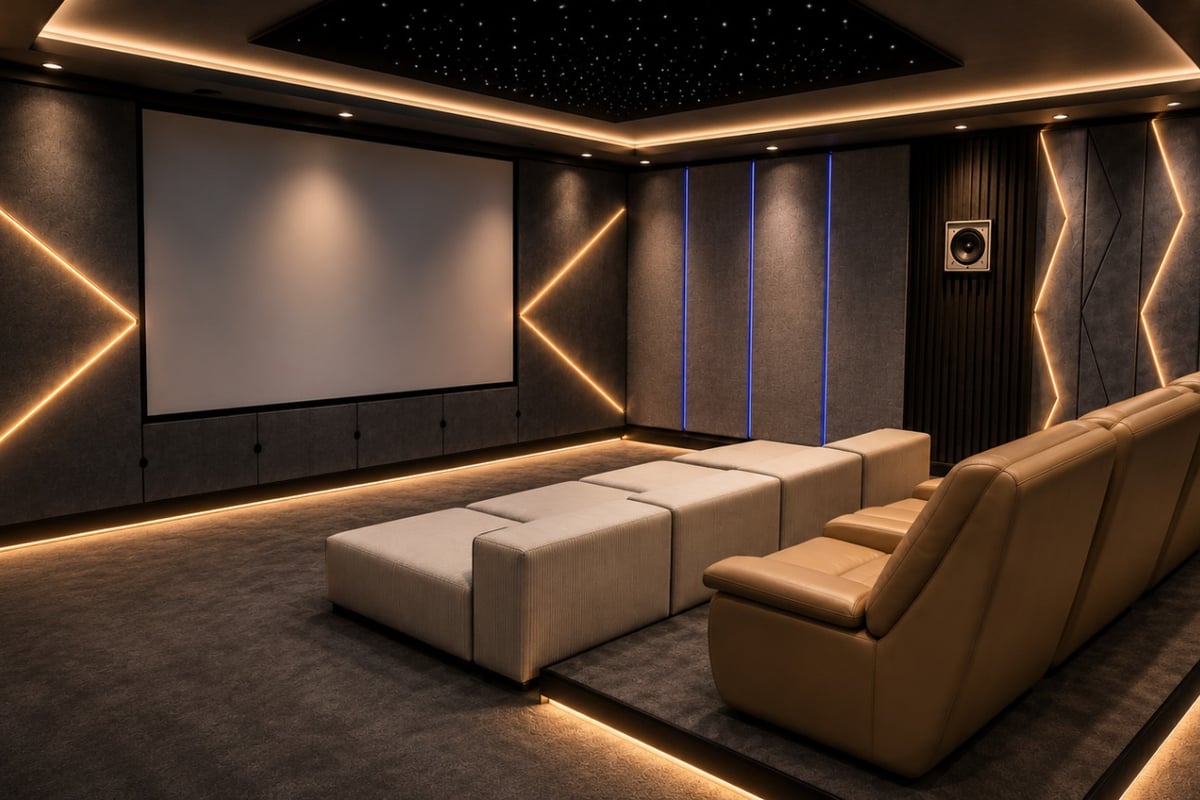
For those investing in a purpose-built viewing environment, professional installation ensures optimal results. A custom home cinema room designed and installed by specialists can incorporate either wireless solutions or traditional wired configurations based on your performance priorities and budget, with designs ranging from R 350,000 to R 950,000 for complete room solutions.
Optimizing Performance Through Environmental Adjustments
Room acoustics influence Sonos surround system performance as much as equipment quality. Hard surfaces reflect sound, creating echoes and harshness. Soft materials absorb energy, reducing reverberation but potentially deadening the space. Balancing these elements creates an environment where your system performs optimally.
Carpet or area rugs on hard floors reduce floor-bounce reflections that muddy dialogue. Heavy curtains or acoustic panels on the wall behind your seating position absorb rear-wall reflections that otherwise create comb-filtering with surround speaker output. Bookshelves, wall art, and varied furniture break up parallel walls that cause flutter echo.
Acoustic Treatment Priorities
Focus treatment efforts in this order:
- First reflection points: Side walls where sound from the soundbar first reflects toward listeners
- Rear wall behind seating: Primary reflection surface for surround speakers
- Ceiling above seating: Secondary reflection point, especially important for Atmos systems
- Front wall corners: Areas where bass frequencies accumulate and become boomy
You need not transform your living space into a recording studio. Strategic placement of existing furnishings often provides adequate acoustic control. Position bookcases along side walls at first-reflection points. Hang thick curtains behind the couch. Add a plush area rug if your room has tile or hardwood throughout.
Integration with Existing Sonos Ecosystem
One significant advantage of choosing a Sonos surround system emerges when you already own Sonos speakers throughout your home. The same app controlling your home theater also manages music playback in the kitchen, bedroom, and outdoor areas. You can group rooms for whole-home audio or maintain independent zones for different family members' preferences.
The Arc, Arc Ultra, and Beam serve dual purposes as both home theater soundbars and high-quality music speakers. When not watching content, these devices stream from Spotify, Apple Music, Tidal, and dozens of other services with the same fidelity as dedicated Sonos music speakers. This versatility makes the investment more justifiable than single-purpose components.
Existing Sonos One SL, One, Play:1, or Play:3 speakers can become surround channels when paired with a compatible soundbar. This allows you to repurpose devices you already own rather than purchasing dedicated surround speakers. Note that mixing speaker generations (pairing Era 300 with original Play:3, for example) requires all devices to run compatible firmware versions.
Troubleshooting Common Setup Challenges
Even straightforward Sonos surround system installations occasionally encounter issues. Network connectivity problems represent the most frequent challenge. Sonos speakers require stable WiFi or wired ethernet connections to maintain synchronization. If your router sits far from the home theater location, wireless performance may suffer.
Creating a dedicated 5GHz network exclusively for Sonos devices eliminates interference from crowded 2.4GHz channels shared with smart home devices, tablets, and phones. Some users achieve better results using Sonos Boost, a dedicated wireless bridge that creates a separate SonosNet mesh independent of household WiFi.
Audio format compatibility issues appear as missing surround channels or lack of Atmos indication in the app. Verify these settings:
- TV audio output set to passthrough/bitstream rather than PCM
- HDMI cable connecting soundbar to TV rated for eARC bandwidth (Ultra High Speed HDMI)
- Source device output configured for Dolby Digital Plus or Dolby Atmos
- Streaming service quality settings enabled for highest available audio (not data-saver modes)
The Sonos app's "About My System" screen displays the current audio format being decoded. Check this while playing known Atmos content to confirm proper signal flow. If you see only stereo or Dolby Digital 5.1 when expecting Atmos, the limitation exists somewhere in your source chain rather than the Sonos hardware.
Third-party reviews from testing organizations like RTINGS and What Hi-Fi? provide measured performance data and real-world impressions that help set realistic expectations for what your system should deliver. Comparing your subjective experience to professional assessments can identify when configuration issues prevent optimal output.
Future-Proofing Your Investment
Technology evolves constantly, and a Sonos surround system purchased in 2026 should remain capable for years despite changing standards. Sonos regularly releases firmware updates adding new features, format support, and streaming service integrations. The Arc received Dolby Atmos capability through a software update months after launch, demonstrating the company's commitment to extending product lifespan.
HDMI eARC support ensures compatibility with emerging audio formats as content creators adopt new encoding techniques. The physical HDMI connection bandwidth accommodates formats beyond current Dolby Atmos and DTS:X implementations, meaning your hardware won't become obsolete when studios release enhanced versions.
Consider these factors when planning for longevity:
- Purchase components with current-generation processors and network chips
- Ensure adequate WiFi coverage in your home theater location for future high-bitrate streaming
- Use quality HDMI cables rated Ultra High Speed (48Gbps) rather than older High Speed versions
- Register products for warranty coverage and update notifications
- Stay informed about soundbar technology evolution through industry publications
The modular nature of Sonos systems means you can upgrade individual components as better models release. Replace the soundbar while keeping surround speakers and subwoofer, or add a second Sub for increased bass output without changing other elements. This flexibility protects your investment better than all-in-one solutions that require complete replacement when any component underperforms.
Advanced Configurations and Multi-Room Scenarios
Power users can extend Sonos surround system capabilities beyond basic soundbar-surround-sub configurations. Dual Sub setups place one subwoofer on each side of the room, smoothing bass response and increasing low-frequency headroom. This configuration particularly benefits large spaces above 300 square feet where a single Sub struggles to pressurize the entire volume.
Some enthusiasts create multiple Sonos home theater rooms in different areas of their homes. The app allows independent control of each theater while maintaining the ability to group them for synchronized playback during parties or when you want consistent audio throughout the house. Each room operates autonomously with its own volume, source, and EQ settings.
Voice control through Amazon Alexa or Google Assistant enables hands-free operation. Built-in microphones in the Era speakers and Arc models respond to wake words, allowing you to adjust volume, change content, or control smart home devices without reaching for your phone. Privacy concerns can be addressed by disabling microphones through physical switches or app settings.
A well-designed Sonos surround system delivers cinema-quality audio without the complexity of traditional installations, making immersive home theater accessible to enthusiasts of all technical backgrounds. As you refine speaker placement, optimize acoustic treatment, and explore advanced configurations, you'll discover performance levels that rival dedicated theater rooms at a fraction of the cost and installation effort. Whether you're building your first surround system or upgrading from an aging receiver, ANR media specializes in custom home cinema and audio video solutions from multiroom configurations to bespoke theater room conversions, ensuring your investment delivers the immersive experience your content deserves.