

Creating an exceptional home theater set up transforms how you experience entertainment, bringing the magic of cinema into your living space. Whether you're converting a dedicated room or optimizing your existing lounge, understanding the fundamental components and strategic planning required ensures you achieve professional-grade results. The right combination of audio equipment, visual display, acoustic treatment, and thoughtful positioning creates an immersive environment that rivals commercial theaters while offering the comfort and convenience of home viewing.
Understanding Your Space and Layout Requirements
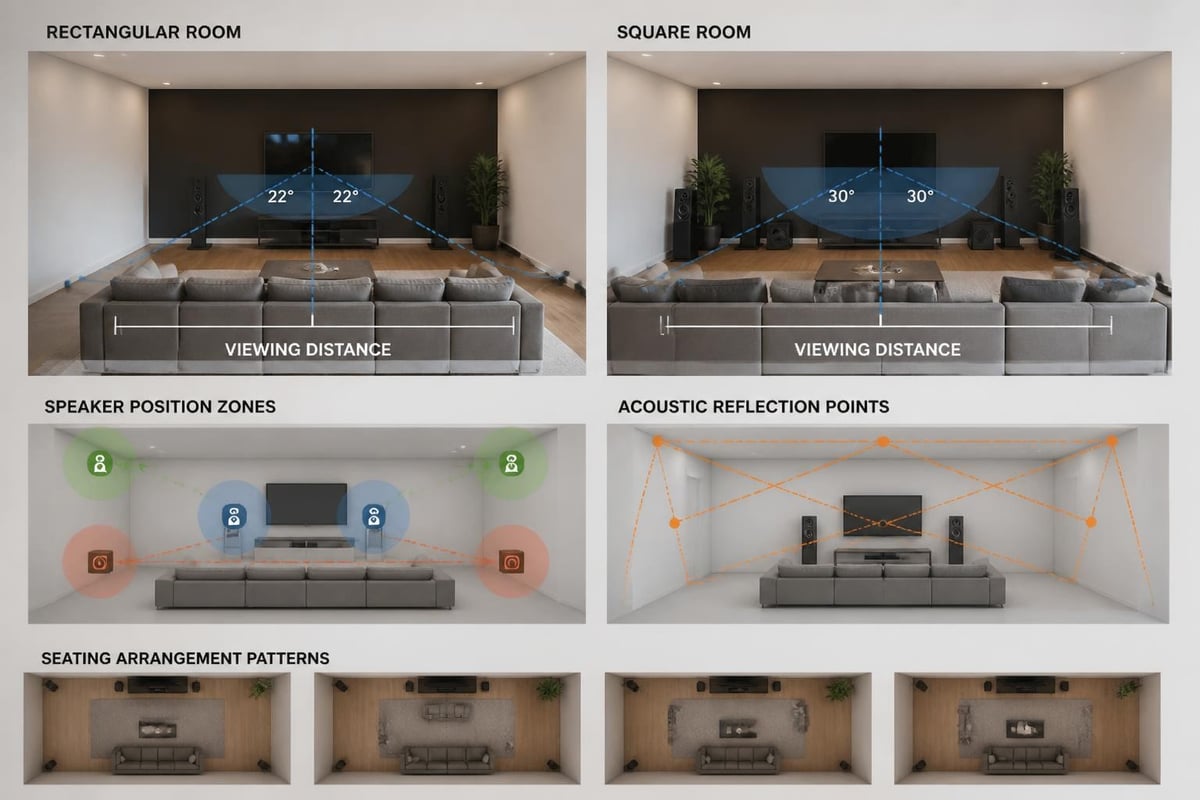
The foundation of any successful home theater set up begins with evaluating your available space. Room dimensions directly influence speaker placement, seating arrangements, and equipment selection. Rectangular rooms typically perform better acoustically than square spaces, which can create standing wave issues that muddy bass response.
Consider the viewing distance when planning your layout. For 4K displays, the optimal viewing distance ranges from 1.5 to 2.5 times the screen diagonal measurement. This positioning allows you to appreciate the enhanced resolution without straining your eyes or noticing individual pixels.
Critical spatial considerations include:
- Ceiling height for overhead speakers in immersive audio formats
- Wall structure for mounting heavy equipment or acoustic panels
- Door and window placement affecting light control and sound isolation
- Existing electrical outlets and cable routing paths
- HVAC vents that may create noise interference
Lighting control plays an essential role in creating the theatrical atmosphere. Natural light from windows can wash out display contrast, while overhead fixtures create distracting reflections. Installing blackout curtains, motorized shades, or dedicated theater lighting systems enables complete environmental control.
Selecting the Right Display Technology
Display technology forms the centerpiece of your home theater set up, with projectors and large-format televisions each offering distinct advantages. Projectors deliver genuine cinema-scale images, with screen sizes exceeding 100 inches creating truly immersive experiences. Modern 4K laser projectors provide exceptional brightness and color accuracy while eliminating lamp replacement concerns.
When considering projector options, evaluate these nine essential factors including resolution, throw distance, brightness measured in lumens, and contrast ratio. Short-throw projectors work effectively in smaller spaces, mounting closer to the screen while still producing large images.
Large OLED and QLED televisions present compelling alternatives, offering perfect black levels, wide viewing angles, and minimal installation complexity. These displays excel in multi-purpose rooms where ambient light control remains challenging. Screen sizes now extend beyond 85 inches, providing substantial visual impact without requiring ceiling-mounted equipment.
| Display Type | Optimal Room | Screen Size | Light Control | Maintenance |
|---|---|---|---|---|
| 4K Projector | Dedicated theater | 100-150+ inches | Essential | Filter cleaning, occasional lamp replacement |
| Laser Projector | Dedicated/Multi-use | 100-200+ inches | Important | Minimal – no lamps |
| OLED TV | Multi-purpose room | 55-88 inches | Flexible | None |
| QLED TV | Bright spaces | 55-98 inches | Very flexible | None |
Projection screens require careful selection based on ambient light conditions and projector specifications. Acoustically transparent screens enable center channel placement directly behind the display, creating seamless audio-visual alignment preferred by serious enthusiasts.
Building Your Audio Foundation
Audio quality defines the home theater experience more profoundly than visual components. A well-executed home theater set up prioritizes speaker selection, strategic placement, and proper calibration to create the enveloping soundscape that makes content emotionally engaging.
The standard 5.1 configuration establishes the baseline, incorporating left, center, right, and two surround speakers plus a subwoofer. This arrangement handles all mainstream content effectively. Advancing to 7.1 adds rear surround channels for enhanced spatial accuracy, while Dolby Atmos and DTS:X systems introduce overhead speakers for three-dimensional sound fields.
Speaker Placement Fundamentals
Center channel speakers carry approximately 60% of movie dialogue, making proper positioning critical. Mount this speaker directly above or below your display at ear height when seated. Angling it toward the primary listening position ensures clarity and intelligibility.
Front left and right speakers should form an equilateral triangle with the main seating position, typically placed at 22-30 degrees from center. Maintain consistent height across all front speakers for seamless panning effects as sounds move across the soundstage.
Surround speakers work best positioned slightly above ear level, mounted 90-110 degrees from the center listening position. This placement creates an immersive bubble of sound without drawing attention to individual speaker locations. Proper speaker placement techniques from manufacturers like Dolby provide detailed diagrams for various room configurations.
Cinema-specific speakers like M&K cinema speakers are engineered specifically for home theater applications, delivering the tonal balance and dynamic range that filmmakers intend. These purpose-built solutions handle complex soundtracks with precision and impact that general-purpose speakers cannot match.
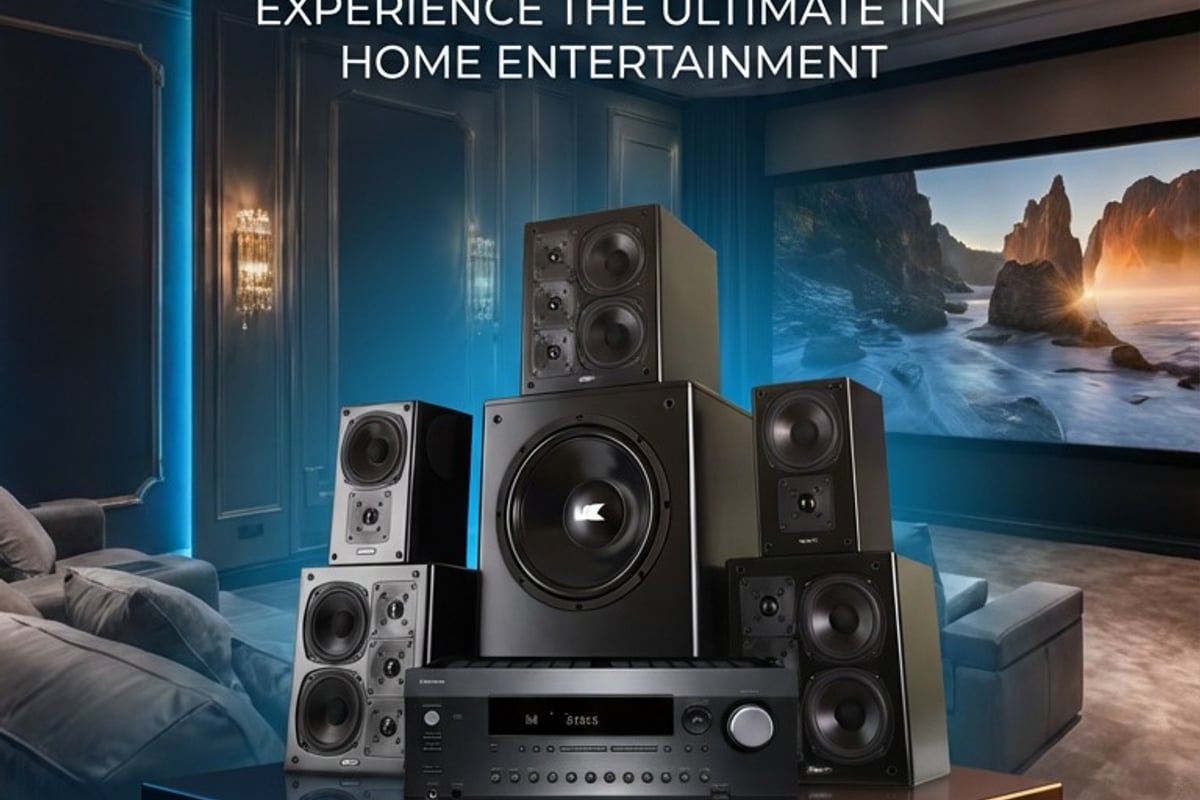
Subwoofer placement requires experimentation to achieve even bass distribution. The "subwoofer crawl" technique involves temporarily placing your subwoofer at the main listening position, playing bass-heavy content, then crawling around the room's perimeter to identify locations where bass sounds smoothest and most powerful. Multiple subwoofer configurations deliver more uniform bass response by minimizing room mode effects.
Receiver Selection and Calibration
AV receivers function as the command center for your home theater set up, managing audio processing, video switching, and system control. Modern receivers must support current HDR formats including Dolby Vision and HDR10+, handle high-resolution audio codecs, and provide sufficient amplification channels for your speaker configuration.
Power ratings deserve careful attention. A quality 7-channel receiver rated at 100 watts per channel adequately drives most home theater speakers in residential spaces. Separate power amplifiers become beneficial for very large rooms or extremely inefficient speaker designs.
Room Correction Technology
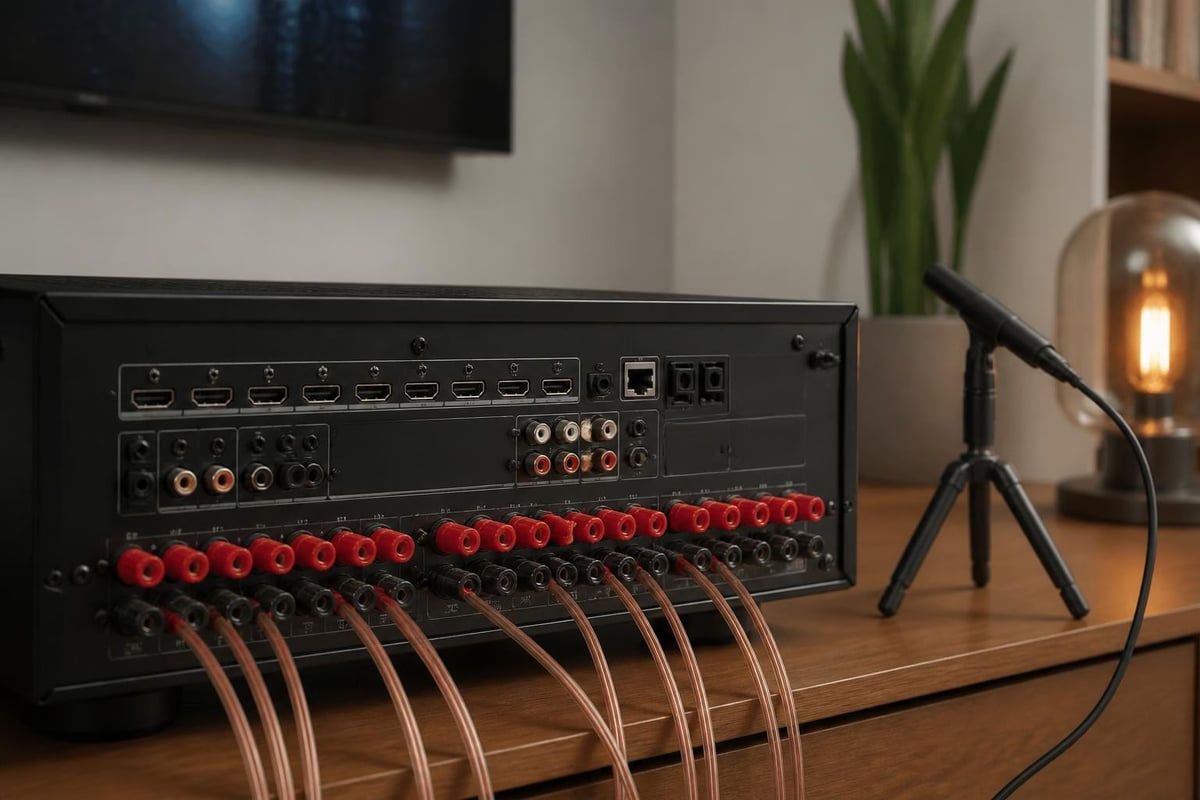
Automated room calibration systems analyze acoustic characteristics using a measurement microphone, then apply digital signal processing to compensate for room-induced frequency response irregularities. Audyssey, Dirac Live, and YPAO technologies each approach correction differently, but all substantially improve sound quality compared to manual setup.
Run calibration from multiple seating positions to optimize performance across the entire listening area rather than favoring a single sweet spot. Save custom calibration profiles for different content types or listening preferences.
Key receiver features worth prioritizing:
- Sufficient HDMI inputs with full 4K/120Hz and eARC support
- Network streaming capabilities for music services and whole-home audio
- Zone 2 capability for extending audio to additional rooms
- Balanced XLR outputs if using external amplification
- Wireless connectivity including Bluetooth and Wi-Fi
Acoustic Treatment and Sound Isolation
Even premium equipment performs poorly in acoustically untreated spaces. Hard surfaces create reflections that blur sonic imaging and cause frequency cancellation. Addressing room acoustics represents one of the most cost-effective improvements possible in any home theater set up.
Absorption panels reduce echo and reverberation by converting sound energy into heat. Place these panels at primary reflection points where sound from your speakers bounces off walls before reaching your ears. The mirror trick identifies these locations – sit at your main position and have someone move a mirror along the side walls until you see each speaker's reflection.
Bass traps combat low-frequency buildup in corners where room boundaries meet. These thicker absorbers require substantial depth to effectively control wavelengths below 100 Hz. Stacking bass traps in room corners from floor to ceiling provides maximum effectiveness.
Diffusion complements absorption by scattering sound reflections rather than eliminating them completely. This maintains a sense of spaciousness while controlling problematic echoes. Position diffusers on the rear wall behind the seating area to prevent harsh reflections back to listeners.
Sound isolation prevents theater audio from disturbing other household areas and blocks external noise intrusion. Common setup mistakes include neglecting door seals and ignoring flanking paths where sound travels through adjacent walls or ductwork.
Source Components and Content Delivery
High-quality source components ensure your home theater set up reproduces content at its full potential. 4K Blu-ray players deliver uncompressed video and lossless audio that streaming services cannot match due to bandwidth compression. While streaming offers convenience, physical media provides reference-quality performance for critical viewing.
Media servers and network-attached storage systems centralize your digital library, making thousands of titles instantly accessible. Organize content using Plex, Kodi, or similar platforms that automatically fetch metadata, artwork, and subtitles. These solutions integrate seamlessly with control systems for simplified operation.
Streaming Integration
Smart TV platforms, dedicated streaming devices, and gaming consoles all access major services like Netflix, Disney+, and HBO Max. Dedicated devices from Apple, Roku, or NVIDIA typically provide more responsive interfaces and longer software support than built-in TV apps.
Gaming integration transforms your theater into an entertainment powerhouse. Modern consoles output 4K at 120Hz with variable refresh rate technology that demands HDMI 2.1 connectivity throughout your signal chain. This low-latency mode benefits both gaming performance and sports viewing.
Consider these source priorities:
- Physical media player for best quality
- Streaming device for convenience and breadth
- Gaming console for interactive entertainment
- Cable/satellite box if maintaining traditional TV service
- Media server for personal content libraries
Seating and Viewing Comfort
Theater seating significantly impacts long-term enjoyment of your home theater set up. Purpose-built cinema chairs feature powered recline, built-in cup holders, and premium upholstery that elevates the experience beyond standard furniture. Multi-row configurations require elevated rear seating ensuring unobstructed sightlines to the screen.
Seating distance from speakers affects tonal balance and spatial effects. Position the primary row where all speakers arrive at roughly equal sound pressure levels. Secondary rows inevitably compromise slightly as they move closer to surround speakers and farther from the screen.
Ideal seating characteristics include:
- Motorized recline for personalized comfort
- Dark fabric that minimizes light reflection
- Adequate width preventing shoulder contact
- USB charging ports and power outlets
- Tactile feedback capability for immersive content
Row spacing must accommodate both legroom and passage. Allow 42-48 inches between rows for comfortable movement without disturbing seated viewers. Center aisles work better than side aisles in wider rooms, maintaining viewing symmetry.
Control Systems and Automation
Sophisticated control systems simplify operation despite technical complexity. Universal remotes consolidate multiple device controls into single interfaces, while whole-home automation platforms like Control4 or Crestron enable one-touch activity scenes that power on equipment, close shades, dim lights, and select sources simultaneously.
Modern home theater setup techniques emphasize user-friendly operation through smartphone apps and voice control integration. Amazon Alexa and Google Assistant compatibility allows hands-free operation for common functions.
Macro programming chains multiple commands together. A "Movie Night" macro might power on the projector, lower the screen, switch the receiver to the correct input, dim the lights to 10%, and set the thermostat to optimal viewing temperature with a single button press.
| Control Level | Complexity | Devices Managed | Customization | Investment |
|---|---|---|---|---|
| Universal Remote | Low | 6-8 devices | Button layout | $100-300 |
| Smart Home Hub | Moderate | 15+ devices | Activity scenes | $300-1,000 |
| Professional Control | High | Unlimited | Fully custom GUI | $2,000-10,000+ |
| Voice Control | Low | Compatible devices | Limited commands | $50-200 |
Backup control methods prevent complete system lockdown if primary controllers fail. Maintain manufacturer remotes for critical components and ensure smartphone apps provide alternative access paths.
Budget Planning and Phased Installation
Building an exceptional home theater set up requires strategic budget allocation across competing priorities. Creating a home theater on any budget becomes achievable through phased implementation and smart component selection.
Entry-level systems starting around $2,000 combine quality soundbars with 65-inch 4K TVs and streaming devices. Affordable starter combinations deliver substantial improvements over built-in TV speakers while maintaining simplicity. Mid-tier installations in the $10,000-25,000 range incorporate discrete surround sound, larger displays or entry-level projection, and basic acoustic treatment.
Dedicated theater rooms with professional installation, custom seating, and reference-grade equipment easily exceed $50,000. These bespoke installations include architectural modifications, complete acoustic optimization, and hidden technology integration that disappears into the design. Home cinema room conversions deliver turnkey solutions where every detail receives expert attention, from soundproofing construction to calibrated audio performance.
Phased installation spreads costs over time while ensuring compatibility for future expansion. Start with quality display and audio fundamentals, then add acoustic treatment, upgraded seating, and automation capabilities as budget allows. Future-proof installations by running conduit for additional speakers and pre-wiring locations before finishing walls.
Investment Priorities
- Display technology – Visible improvement, difficult to upgrade
- Front speakers and subwoofer – Foundation of audio quality
- AV receiver – Processing hub supporting future formats
- Acoustic treatment – Maximizes existing equipment performance
- Seating – Daily comfort and viewing experience
- Surround speakers – Completes immersive soundfield
- Automation – Convenience and ease of use
Professional calibration justifies its cost through optimization that DIY approaches cannot achieve. Trained technicians use specialized measurement equipment and decades of experience to extract maximum performance from your components, often revealing capabilities you didn't know existed.
Maintenance and System Optimization
Regular maintenance preserves performance and extends equipment lifespan in your home theater set up. Projector filters accumulate dust that reduces brightness and increases operating temperature. Clean or replace filters every 3-6 months depending on environmental conditions. Laser projectors eliminate lamp aging concerns but still require occasional filter attention.
Speaker connections loosen over time from thermal cycling and vibration. Annually inspect all terminal connections ensuring tight contact between bare wire or banana plugs and binding posts. Oxidation forms on connectors exposed to air, increasing resistance and degrading signal transfer.
Firmware updates address bugs and add features to AV receivers, displays, and streaming devices. Enable automatic updates where possible, or check manufacturer websites quarterly for new releases. Major updates occasionally introduce compatibility issues, so research user experiences before installing significant revisions.
Room calibration merits periodic re-running when you move furniture, add acoustic treatments, or replace speakers. Seasonal humidity changes affect acoustic properties in some climates, making spring and fall recalibration beneficial for critical listening environments.
Performance Verification
Calibration Blu-rays from Spears & Munsil or Disney WOW provide test patterns verifying display geometry, color accuracy, and motion handling. Audio test tones confirm channel levels, phase relationships, and frequency response. Running these diagnostics annually catches gradual degradation before it becomes obvious during normal viewing.
Document your system configuration including:
- Equipment model and serial numbers
- Custom settings and calibration values
- Cable routing and connection diagrams
- Remote programming and macro configurations
- Warranty expiration dates and support contacts
This documentation proves invaluable when troubleshooting issues or working with installers for system expansions. Photograph complex cable runs before finishing walls or closing equipment racks.
Your home theater set up journey combines technical knowledge with creative vision, balancing performance capabilities against practical constraints and budget realities. The most successful installations prioritize fundamentals like proper speaker placement and acoustic treatment while selecting quality components that work cohesively as a complete system. Whether you're transforming a spare room or designing a dedicated cinema from scratch, ANR media brings specialized expertise in custom home cinema and multiroom audio solutions that deliver professional results tailored to your specific needs and preferences.